We shortlisted the 6 best Loxo integrations for recruiters

Recruiting rarely fits into one tool. Loxo covers a lot, with its ATS, CRM, sourcing and AI features, but you’ll still need integrations for things like calls, scheduling and job distribution.
But no single platform covers every part of recruitment. You might still need a separate tool for calls, interview scheduling, job distribution, marketing or contract staffing operations.
We’ve picked 6 Loxo integrations worth looking at, with a breakdown of what they do, how they connect and what they cost.
Quick answer: The best Loxo integrations for staffing agencies
| Integration | Best for | How it connects to Loxo | Price |
| 1. CallMantra | Calls, texts and AI call notes logged to Loxo | Direct integration | From $20.95 per user per month |
| 2. Arrange | Interview scheduling with meetings written back to Loxo | Loxo API key. Customer-Preferred partner | Free Starter; Pro from $35 per user per month |
| 3. Broadbean | Distributing Loxo jobs across multiple job boards | Enabled in Loxo settings | Quote-based |
| 4. HubSpot | Syncing Loxo contacts for marketing and business development | Native integration in Loxo settings | Free CRM for up to 2 users and 1,000 contacts |
| 5. Hireflix | One-way video interviews triggered by a Loxo pipeline stage | Loxo API key | From $75 per month |
| 6. Ascen | Onboarding, payroll and invoicing for contract placements | Vendor data sync. Customer-Preferred partner | Quote-based |
How we selected these six Loxo integrations
A few criteria shaped the list:
A clear purpose: Each integration covers a different part of the recruiting workflow: calling, scheduling, job posting, marketing, screening and contract back-office operations.
A documented Loxo connection: Every tool has a documented connection method, through the Loxo Marketplace or a setup guide published by Loxo or the vendor.
Transparent pricing where available: We checked vendor pricing pages and included published prices wherever possible.
How we checked: We reviewed each vendor’s Loxo setup documentation and pricing information, along with Loxo’s own help centre and pricing page, on November 2, 2026.
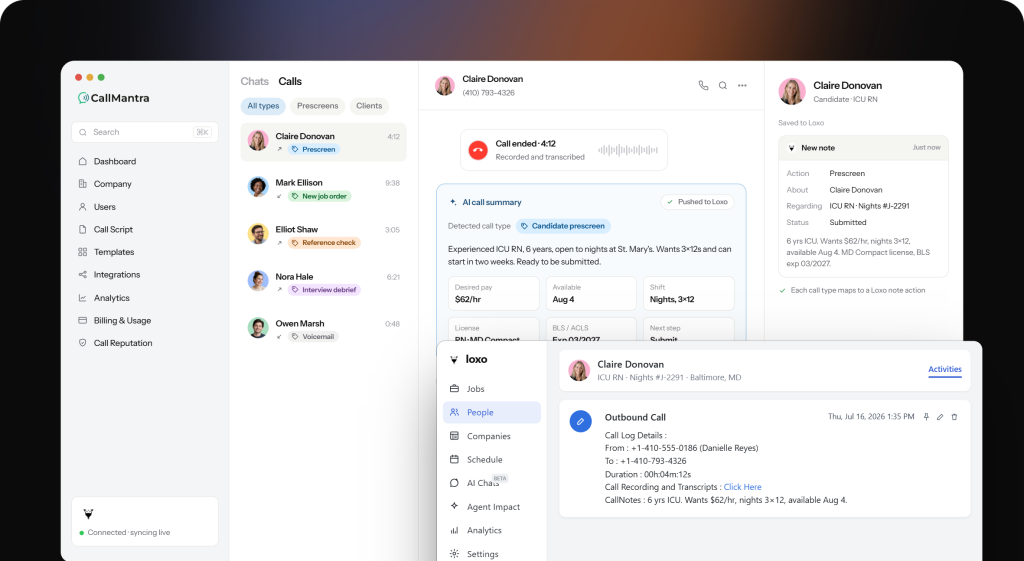
Best for: Recruiting teams that want calls, texts, AI-generated call notes, SMS automation, analytics and more connected to Loxo. No more juggling separate tools for calling, SMS, and note-taking.
Pricing:
– Standard: $20.95 per user per month
– Pro: $39.95 per user per month
– Premier: $79.95 per user per month
Plans are billed annually, with a month-to-month option and a 14-day free trial.
What CallMantra brings to your Loxo setup
Call and text logging: Recruiters call and message candidates from a business phone number, and conversations get logged against the corresponding person in Loxo.
AI call notes: CallMantra transcribes calls and writes summaries.
AI texting: Let AI create tailored messages using each candidate’s resume, job details, and conversation history. You can also write your own messages and save them as reusable templates for your team.
Power SMS and SMS Sequencing: Send one personalized message to your entire candidate list at once, with real-time delivery and reply tracking. Need ongoing follow-up instead? CallMantra sends a series of messages automatically and stops the moment a candidate replies.
Power dialer: Recruiters can work through a shortlist without dialing every number by hand. With one click, they can leave a voicemail drop and send a follow-up text when a candidate doesn’t answer.
Call intelligence: Every call is automatically transcribed and summarized by AI. Key details like salary, skills, and next steps are logged straight into your ATS, so recruiters don’t have to type a thing.
Ask AI: Build your own prompts per call type so summaries capture exactly what matters, or ask AI any question about the call, right when you need it.
AI Candidate pitches: Turn candidate profiles into compelling pitches without starting from scratch. CallMantra uses resumes, job descriptions, and call insights to highlight relevant skills, experience, and selling points, helping recruiters present candidates to clients with confidence.
Number reputation monitoring: Monitors phone number reputation and handles delisting, which lowers the odds of candidates seeing a “Spam Likely” warning.
Analytics: Calls, texts, and recruiter activity are tracked automatically in real time. Get a clear view of team performance or zoom in on individual recruiters to see trends, response rates, and engagement.
Available for Mac, Windows, iOS, Android and Web: CallMantra works across web, desktop, and mobile, so recruiters can make calls, send texts, and manage candidate conversations from wherever they are. Switch between devices and pick up right where you left off.
| “CallMantra makes it easy to switch between calls, texts, and our CRM, with a custom integration that keeps all our communication organised. The intuitive interface, great softphone, Chrome extension, and thoughtful features make it a pleasure to use.” Sol G. President, G2 review |
2. Arrange
Best for: Recruiters who want interviews coordinated without the scheduling email tennis.
Pricing:
Starter plan: Free
Pro: $35 per user per month.
Enterprise: Custom pricing
How Arrange works with Loxo
Arrange is an interview scheduling platform built for recruiters. Rather than trading emails back and forth to land on a time, you send a scheduling link. The candidate and hiring manager pick a slot, and Arrange books the meeting.
The Loxo integration keeps the process tied to your recruiting workflow:
- The scheduled meeting shows up on the person’s Loxo profile.
- Candidate scheduling links get tracked through Loxo’s Live Stage Tracker.
- Arrange pulls candidate details from Loxo and associates the candidate with the relevant job once the interview is booked.
Why it’s on the list: Scheduling can stall an otherwise fast-moving search. Arrange cuts out the back-and-forth and writes the meeting into Loxo, so recruiters aren’t juggling the process across separate systems.
3. Broadbean
Best for: Recruiting teams that want Loxo job listings pushed across a wider set of job boards.
Pricing:
Quote-based.
How Broadbean works with Loxo
Loxo already distributes published jobs to a handful of boards through its own feed:
– Indeed
– Glassdoor
– SimplyHired
– Talentify
– ZipRecruiter
For a job to appear through that automatic feed, a few conditions have to be met: Publish must be enabled, the start date must be in the past, and the job status must be Active. Loxo also supports posting to other boards, Monster, CV-Library, Reed, and SEEK among them.
Broadbean stretches that distribution further. Once the integration is enabled, you pick Post to Broadbean from a Loxo job and manage the ad through Broadbean. Broadbean says its platform distributes jobs to more than 7,000 job boards and channels. Depending on how your account is set up, applicants come back to Loxo through its public job page or by applying straight through email.
Why it’s on the list: If job boards drive a meaningful share of your applicants, Broadbean distributes vacancies far more widely without anyone recreating listings by hand.
4. HubSpot
Best for: Recruiting firms running marketing and business development in HubSpot that want contact records kept in sync with Loxo.
Pricing: Loxo’s guide doesn’t mention a separate fee for the connection. HubSpot offers a free CRM, with paid plans priced per seat. See HubSpot’s pricing page for current details.
How HubSpot works with Loxo
The integration keeps contact records in step across both platforms.
Add a contact in Loxo and the record gets created in HubSpot, as long as it has a valid email address. Loxo maps fields like name, email, phone, address, current company and title, and edits to a profile to send the update across. Make sure the sync is turned on.
A few limitations worth knowing before you flip it on:
Existing contacts: Only contacts added after the integration is enabled sync automatically. Want older contacts moved across? Loxo Support can bulk-load them.
Contact lists: Loxo sends contacts to HubSpot’s general list. It won’t sort them into specific HubSpot lists on its own.
Mobile numbers: A phone number only syncs as a mobile number when its phone type is set to “Mobile” in Loxo.
Email updates: Email address changes made in HubSpot don’t sync back to Loxo. Make email updates in Loxo instead.
Why it’s on the list: Plenty of recruiting firms run client newsletters, business development and marketing campaigns out of HubSpot. The integration keeps contact information current without endless CSV exports.
5. Hireflix
Best for: Recruiting teams that want to screen candidates with one-way video interviews before booking a live call.
Pricing:
– Small: $75 per month (on annual plan)
– Medium: $150 per month (on annual plan)
– Other plan: Custom pricing
How Hireflix works with Loxo
Hireflix wires video screening into your Loxo recruitment pipeline. Once the integration is configured, moving a candidate into a designated pipeline stage fires off an interview request.
The flow currently looks something like this:
- Create two stages in your Loxo workflow, such as “Send Hireflix Interview” and “Hireflix Interview Completed.” Then select both stages in Hireflix’s Loxo settings.
- Connect each Loxo job to the Hireflix interview you want candidates to receive. You only need to do this once per job.
- Move a candidate or an entire group into the “Send Hireflix Interview” stage. Hireflix will automatically send the video interview, usually within a few minutes.
- Once a candidate completes the interview, Hireflix automatically moves them to the “Hireflix Interview Completed” stage. The interview link will appear in their Loxo Activity tab, where anyone with access to the candidate’s profile can watch the interview and read the transcript without needing a Hireflix login.
- The video link lands in the candidate’s Loxo activity tab. Your team can watch the interview without signing in to Hireflix, and the transcript is available in Loxo too.
Why it’s on the list: One-way video interviews take the sting out of early-stage screening, especially with high applicant volume. Recruiters can review a batch of candidates before deciding who earns a phone conversation.
6. Ascen
Best for: Contract and temporary staffing firms that need help with onboarding, payroll and invoicing.
Pricing: Quote-based.
How Ascen works with Loxo
Ascen provides back-office and employer of record services for contract staffing businesses: onboarding, compliance, time tracking, payroll and invoicing.
The Loxo integration connects the two platforms through a data sync, so recruiters and operations teams aren’t re-entering the same information in both systems. Loxo announced the integration in 2023.
Why it’s on the list: Loxo covers most of the front-office recruiting process. Contract placements pile on extra operational requirements, compliance, payroll and invoicing chief among them.
Ascen gives firms a documented way to run that side of the business without building a whole back office from scratch.
Other Loxo integrations worth considering
The six above cover the most common integration needs, but they’re not the full picture. Depending on your workflow, these might deserve a look too.
Metaview: An AI notetaker for interviews. Per Loxo’s help centre, meetings scheduled in Loxo sync with Metaview, which transcribes and summarizes them, and the notes and summaries land back on Loxo profiles. It could work as an alternative to Loxo’s AI Notetaker for video interviews.
SourceWhale: A recruiter outreach platform that connects with a Loxo bearer token and agency slug. It can add candidates and contacts to Loxo and create notes from outreach activity.
Indeed and other job boards: Loxo’s automatic job feed distributes active listings to Indeed, Glassdoor, SimplyHired, Talentify and ZipRecruiter with no separate integration. Sponsored listings are billed by the job board in question.
Zoom, Microsoft Teams and Google Meet: These connect with Loxo’s AI Notetaker for recording and summarizing video meetings.
Mailchimp: Listed on the Loxo Marketplace. Worth considering for firms sending client and candidate newsletters without HubSpot.
Clay: If you’re looking to automate candidate sourcing, data enrichment, and outreach workflows.
Workday: For teams that need Loxo data flowing into Workday.
Talentalk: Syncs LinkedIn messages into Loxo.
Looking beyond Loxo? We’ve also put together a guide to AI recruiting tools for staffing agencies.
Putting it all together
The right Loxo integrations can save your team time and make day-to-day recruiting easier.
If calls and texts are a big part of your workflow, CallMantra brings them together with Loxo, along with AI-powered notes and follow-ups, so recruiters can spend less time on admin and more time building relationships.
Frequently asked questions
How many Loxo integrations are there?
The Loxo Marketplace lists about 47 partners.
How does a Loxo Marketplace integration work?
It's a connection between Loxo and a third-party provider listed in the Marketplace.
Setup depends on the provider. Some integrations switch on under Settings > Integrations in Loxo. Others ask for a Loxo API key and your agency slug, entered either in the partner's platform or on Loxo's Integrations screen.
Either way, you'll still need an account with the third-party provider to use its service.
How do you choose the right Loxo integrations for your recruiting firm?
The best Loxo integration really depends on the type of recruiting your firm does. For executive search and retained recruitment, start with calling, texting and reliable notes through CallMantra, along with interview scheduling through Arrange.
For contingency and high-volume recruiting, Broadbean for job distribution, Hireflix for video screening, and CallMantra for dialing can help keep larger candidate pipelines moving.
Contract and temporary staffing firms can look at Ascen for onboarding, compliance, payroll, and invoicing. If your focus is client marketing and business development, HubSpot helps keep marketing contact records aligned with Loxo.
Before choosing an integration, here are a few practical questions you can ask yourself:
- Does it require a Loxo API key, and does your current plan include API access?
- Is the tool listed on the Loxo Marketplace, or does the vendor manage and support the connection directly?
- Where does the information appear in Loxo: the candidate profile, activity stream, or a pipeline stage? And if syncing stops, who do you contact for support?
These details can have a bigger impact on your day-to-day workflow than the feature list alone.
Why does phone integration matter in Loxo?
Loxo's own help centre says it plainly: you need a VoIP partner to make calls from the platform. Without one, you can't place calls through Loxo, even with a personal phone number connected.
So a phone integration isn't really optional for recruiting teams calling through Loxo. The better question is what happens once the call starts. Does the conversation get logged? Can recruiters find the notes afterwards? Can they follow up without hopping between tools?
CallMantra is a calling and texting platform built for staffing and recruiting firms. It folds those communication workflows together and ties them into your ATS.
Does Loxo have built-in calling?
No. According to Loxo's help centre, you need a VoIP partner to place calls through Loxo.
What's the best Loxo phone integration?
Start with how well the integration fits the way your recruiters call and follow up every day.
It should log calls and texts against the right Loxo profile, keep call notes easy to retrieve, and let recruiters run calls and messages from a business number.
CallMantra was built around exactly those calling and texting workflows in staffing and recruiting.
What is Loxo?
Loxo is recruiting software for staffing agencies and search firms, combining an applicant tracking system (ATS) with a recruiting CRM. Higher-tier plans add Loxo Source, its sourcing database, plus AI agents for jobs like outreach and admin.
What does the Loxo Chrome extension do?
Loxo's Chrome extension lets recruiters add people to the platform from social profiles and most web pages, capturing whatever contact information is visible on the page.
The extension ships with every Loxo plan, starting at Core.
Does Loxo integrate with HubSpot?
Yes. Loxo has a native HubSpot integration you can enable through its settings.
Is Loxo an ATS or a CRM?
Both. Loxo's pricing page describes Core as a full ATS and recruiting CRM with AI search. Professional adds Loxo Source and AI agents.
How much does Loxo cost?
Loxo's Core plan starts at $149 per user per month billed annually.
Professional and Enterprise pricing come after a demo. Your plan matters for integrations too. Loxo lists API access under Professional, so check your subscription before buying any tool that needs an API connection.
Does Loxo offer a free trial?
Yes. Seven days, full Professional access, no credit card required.
Use the trial window to test integrations that need API access before deciding which plan fits your firm.
Does Loxo have an API?
Yes. Loxo provides an Open API with webhooks for candidates, companies, deals, jobs, people and placements. The API is a paid feature. Account administrators create API keys under Settings > API Keys. Loxo publishes its API reference here